01
Duplicates
The same photo. Again. And again.
Find exact copies of photos and videos with a byte-for-byte comparison. Keep one, review the rest.
Duplicate photo cleaner for iPhone
Scan on your iPhone, compare the copies, and choose what stays. Review one group or 10 at a time, then confirm removal in Apple Photos.
Scanning and results are free. First 10 item removals included. Optional $9.99 one-time unlock.
iPhone · iOS 17+ · US price; local pricing may vary.
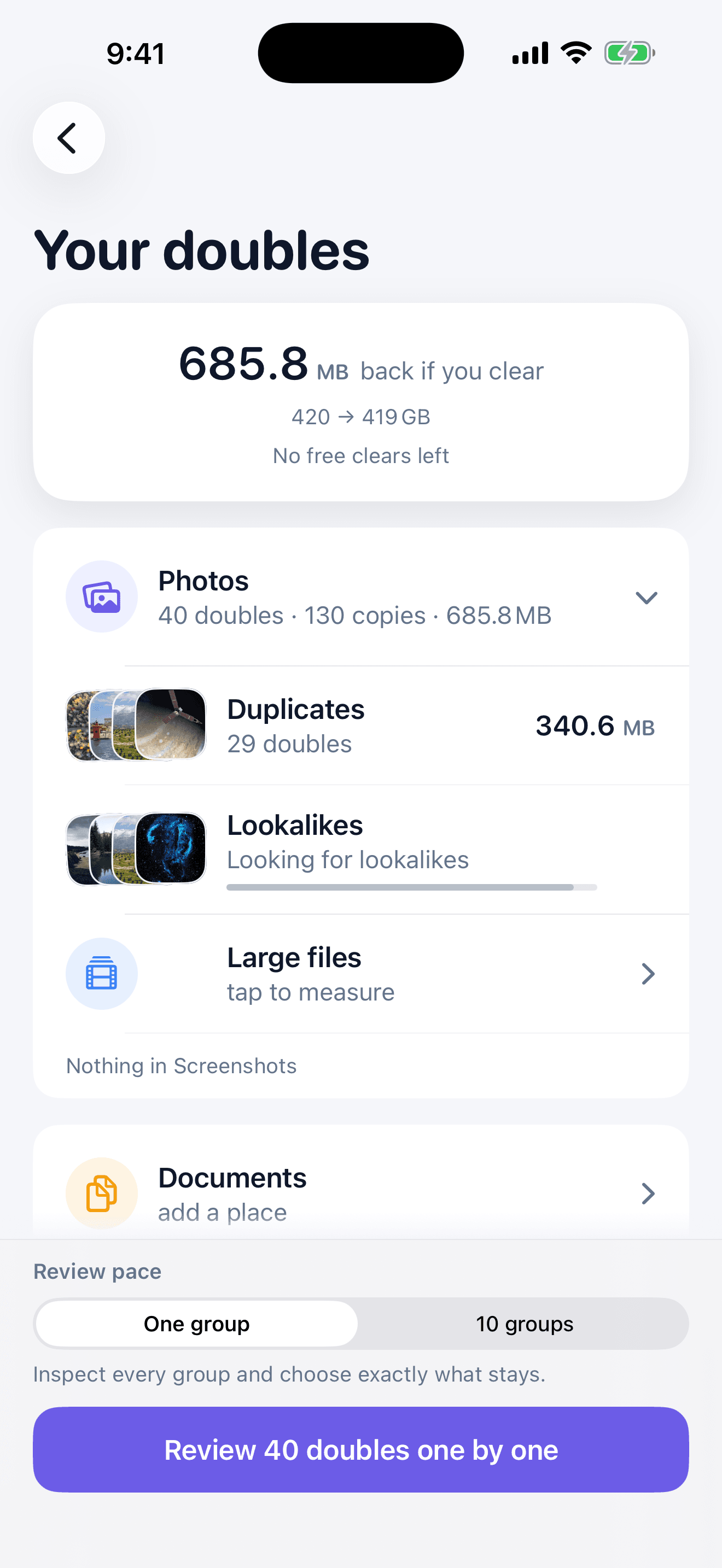
One tidy place for all the extras
From a burst of almost-the-same selfies to another copy of that download. Find what’s taking up space, then decide what stays.
Duplicates
Find exact copies of photos and videos with a byte-for-byte comparison. Keep one, review the rest.
Lookalikes
Group similar shots and retakes, with a suggested keeper and a reason. The final choice is always yours.
Screenshots
Find old screenshots and save their text as searchable cards before clearing the images you no longer need.
Large files & Shrink
Spot the biggest photos and videos. Make a smaller copy with Shrink, then compare before removing an original.
Documents
Find identical documents in the Files folders you choose, including PDFs, spreadsheets, archives and downloads.
Choose your pace
Opening review selects nothing for removal. You stay in control in either mode.
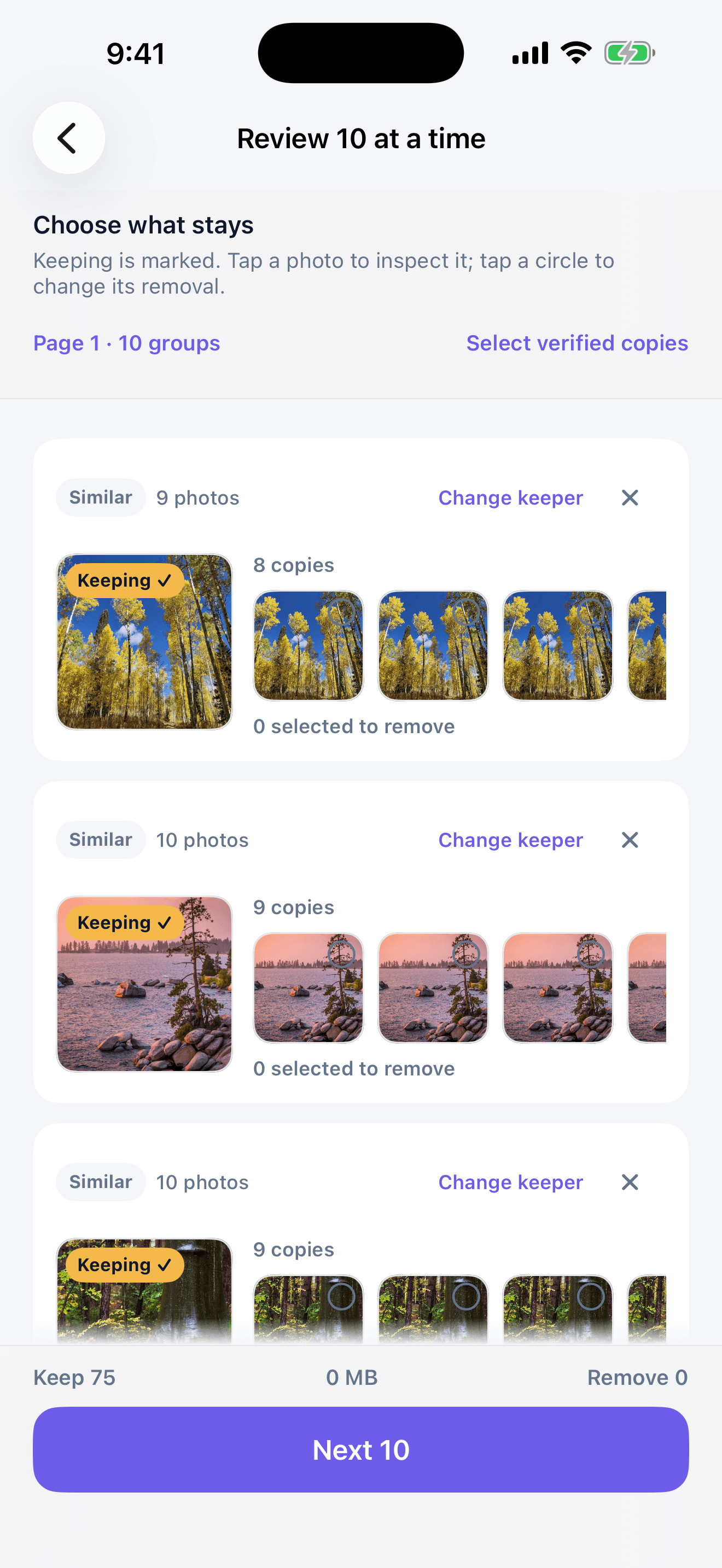
One group
The default when possible duplicates or similar photos need a closer look. Inspect each photo, then choose the keeper and copies yourself.
10 groups
See up to ten groups per page. Select individual copies or explicitly choose verified copies; uncertain matches remain manual.
Your photos. Your call.
Give access to your photos or choose a Files folder. Matching and grouping happen on your iPhone.
Take a careful stack-by-stack pass or review up to ten groups on a page. Nothing starts selected.
Inspect a photo, choose the keeper, then select only the copies you want removed.
Review the exact item count, then approve Apple’s system prompt. Photos move to Recently Deleted first.
Photo storage is released after permanent removal by iOS or when you empty Recently Deleted. Recovery of documents depends on the file provider.
How deletion and recovery work →
Scan and review free · first 10 item removals included
Private by design
Your photos, documents and screenshot text are processed on your iPhone. The app has no account, advertising or app analytics, and doesn’t upload your library to us.
A tidy phone. A simple price.
No weekly charge. No subscription to remember to cancel.
Explore free
See every result and choose your cleanup pace.
Remove without limits
Continue removing items after the starter allowance.
US price shown. Apple displays your local price before purchase. The unlock is an optional in-app purchase. Purchase terms · Restore & refunds
No. Scanning and opening either review mode selects nothing for removal. You choose each removal, review the total, and then confirm through Apple Photos.
One successfully removed photo, video, or document counts as one item. The first 10 item removals are a single starter allowance shared across cleanup tools; it is not per group or monthly.
A verified duplicate is confirmed from original file data. Possible duplicates and similar photos are labeled separately and require your individual choice.
Use One group for careful comparison, especially for possible or similar matches. Use 10 groups to move faster across a page. Both modes start with nothing selected.
Apple Photos moves approved items to Recently Deleted. Storage may become available only after iOS permanently removes them or you empty Recently Deleted.
Dupelganger performs photo matching and review on your device and does not upload your library to us. Apple iCloud Photos and file providers still operate under your system settings.
No. After your first 10 item removals, unlimited removal is an optional $9.99 US one-time App Store purchase. Apple shows your local price before purchase.

A little less clutter. A lot more room.
Keep the memories. Make room for whatever comes next.
Scan and review free. Your first 10 individual item removals are free. Continue removing with an optional one-time purchase.
US price shown. Local price and availability appear in the App Store. iOS 17 or later.